harness hosting
what is harness?
harness is a piece of code that turns model responses into an ongoing process of observing, acting, and checking results.
-
the model returns text or structured tool calls.
-
the harness supplies context, executes permitted calls, records their results, and decides whether to continue, pause, or stop.
hosting a harness means operating this program and the resources it depends on. the central decisions are where work executes, what survives a failure, and what the agent is allowed to access.
let’s use one example throughout: “fix issue #482: checkout becomes negative when the discount exceeds the subtotal. add a regression test and prepare a pull request.”
components of agent loop
these are logical responsibilities. they do not each need a separate server, and the supporting services are not all part of the harness runtime.
| component | what it contains | example in our cloud agent |
|---|---|---|
| harness runtime | agent loop, context builder, instruction/skill loaders, model client, tool registry, session logic | coordinates the checkout fix |
| model inference service | hosted model api or self-hosted model serving | receives context and returns text or tool calls |
| agent execution environment | vm/container, bash, git, node, file tools, application processes | executes npm test |
| persistent storage | 1. workspace; 2. instructions and skills; 3. session/workflow state; 4. reusable memory (mem0, letta, etc) | project files plus recorded job progress |
| external tool gateway / mcp servers | source control, monitoring, business systems, communication, deployment, knowledge/data integrations | reads a github issue and creates a pr |
| identity and credential service | secrets, tokens, workload identities, scoped credentials | authenticates access to github and the model api |
| policy and approval service | authorization rules, action scopes, approval enforcement | checks whether the job may publish this change |
harness runtime and model inference
the harness builds the request from the user query, applicable project instructions, available skills, tool definitions, and conversation history. source files enter the context when loaded or read through tools.
for the checkout task, project instructions might require integer cents and specify the test command. the model can then request the issue details, inspect the relevant files, propose edits, and ask to run tests. the harness executes permitted requests and returns observations for the next model call.
the inference service generates those responses. it can be a hosted api or a model deployment you operate. hosting the harness does not require hosting the model on the same machine.
execution environment and external tools
the execution environment is where file operations and commands actually happen. it contains the project directory, dependencies, utilities, and any running application processes. in this example, it edits checkout.ts and executes npm test.
external integrations give the agent access to systems beyond that environment. a github integration reads the issue and creates a pr. other categories include monitoring, business systems, communication, deployment, and knowledge services.
these integrations can be custom functions or mcp servers. they may run alongside the harness or behind a remote service. their location determines where authenticated requests happen and which network connections are required.
persistent storage
storage holds four different kinds of data:
| category | example | what it preserves |
|---|---|---|
| workspace | /agent-data/workspaces/job-482/ | repository, edits, dependencies, outputs |
| instructions and skills | project AGENTS.md and /agent-data/skills/ | guidance the harness loads |
| session and workflow state | transcript files and a sqlite database (jsonl files) | conversation, tool results, job status, approvals |
| memory (mem0, letta, etc) | /agent-data/memory/checkout.md | reusable knowledge for later tasks |
these can start on one persistent disk. workspace describes a directory, while instructions and memory describe content stored in files or other records. AGENTS.md can live inside the project; session and approval state can live in a database on the same disk.
sharing storage does not mean sharing write permissions. the agent may edit project files without being allowed to rewrite its approval records or another customer’s session.
as workers scale, active workspaces can stay on worker disks, structured state can move to a shared database, and recovery copies can move to object storage. persistence must survive the failures the system promises to recover from.
identity, credentials, policy, and approvals
| responsibility | question | example |
|---|---|---|
| identity | who is acting? | job 482, belonging to acme |
| credential | how is access authenticated? | acme's github app token |
| policy | is this operation permitted? | read issues, but never merge prs |
| approval | is this exact action authorized? | user approved publishing this patch |
a valid github token does not mean the proposed pr has been approved. approval does not provide the credential needed to execute it.
the integration should authenticate the job, check its scope, and use the appropriate credential. an approval should identify the repository, operation, and exact proposed change. changing the patch requires reevaluating the authorization.
this affects hosting: keeping credentials and approval enforcement outside the environment running project code creates a clearer boundary. a policy written only in the model’s instructions cannot enforce that boundary.
requirements that shape hosting
before choosing a layout, define durability, access, and resource requirements.
durability
| durable session | durable execution | |
|---|---|---|
| what is preserved? | conversation, tool results, session metadata | recorded execution progress, completed steps, pending waits, recovery information |
| what does it enable? | restart a harness and continue the conversation | recover the job and determine what should happen next |
| example | recover the issue details and previous observations | remain paused until the proposed pr is approved |
| what is not automatic? | restoration of workspace files or running processes | preservation of arbitrary ram, live shell processes, or exactly-once external effects |
a session can be recoverable while its workspace is lost. a workflow can remember that a test started while the actual test process has died. these states need to be preserved or reconstructed together.
| crash happens | what recovery requires |
|---|---|
| after reading the issue | saved session, or fetching the issue again |
after editing checkout.ts | persisted workspace or patch, plus enough execution state to continue correctly |
halfway through npm test | detect the interrupted attempt and usually restart the tests |
| after creating a pr but before recording success | inspect github before retrying the action |
for the checkout agent, recovery therefore needs the conversation, the relevant workspace version, and enough execution state to decide what should happen next. external writes also need reconciliation or idempotency so retries do not blindly repeat an action.
access and isolation
a sandbox defines what execution can access. it may use a vm, a container, or other isolation mechanisms. setting the working directory to /workspace/shop does not itself prevent access to other files or the network.
choose filesystem, network, identity, and resource boundaries around the task. the agent needs access to its repository and test dependencies; it does not automatically need production credentials or another job’s files.
the restrictions must still allow the work to complete. browser testing, private package registries, and local databases can all change the required environment.
compute
calling a hosted model api does not require a gpu on the harness machine. most additional resource demand comes from the execution workload.
these are illustrative starting allocations for one active agent, not benchmarks or guarantees:
| workload | cpu | ram | disk |
|---|---|---|---|
| harness with remote tools | 1–2 vcpu | 1–2 gib | 5–10 gib |
| harness plus modest repository and tests | 2–4 vcpu | 4–8 gib | 20–50 gib |
| harness plus browser, builds, local services | 4–8 vcpu | 8–16+ gib | 50–100+ gib |
measure peak usage on representative tasks. browsers, builds, parallel tests, and dependency caches can dominate the harness itself. when execution is remote, those costs move to the execution host.
hosting options
the main placement decision is whether the harness and execution environment share a machine. all four layouts can support durable sessions and execution, provided their state and recovery mechanisms survive worker failure.
| layout | how it works | main benefit | main cost |
|---|---|---|---|
| same vm | harness reads local files and launches local commands | simple integration; compatible with local coding tools | harness and tools share host failure and resource pressure |
| separate containers, same vm | harness calls an execution container through an api | separate process lifecycles and resource limits | host failure remains shared; mounts and privileges need care |
| harness service plus remote execution | harness calls read/edit/exec endpoints on another environment | independent replacement, scaling, and access boundaries | remote tool adapters, network failures, process tracking |
| coordinator plus complete agent workers | each worker has its own harness and execution environment | natural fit for agents with their own computers | per-agent state, artifact exchange, conflicting edits, coordination |
harness and execution together
one vm is the most direct setup for a harness that expects a local shell and filesystem. the project, tools, and harness share an environment. a replacement worker restores the session and workspace before continuing.
separate containers on that vm add independent process lifecycles and resource limits. they can reduce interference, but they still share host failure. shared mounts and privileges determine how much isolation they actually provide.
harness and execution separate
a dedicated harness service calls remote file and command interfaces. execution machines can be replaced or resized without moving the harness, and trusted credentials can stay outside them.
the trade-off is integration work. remote calls can fail ambiguously, long-running commands need identities and status tracking, and built-in local tools may need adapters. separating the processes does not automatically solve recovery.
complete agent workers
for multiple agents with their own computers, a coordinator can assign tasks to workers that each contain a harness and execution environment.
this keeps local tooling intact and allows different worker environments. it also requires per-agent sessions, ownership of files or branches, artifact exchange, and a way to reconcile conflicting changes.
the distinction is whether the central service controls individual tools or delegates work to another agent.
operating model and lifecycle
these layouts can run on vms you manage, a container platform, kubernetes, or managed execution infrastructure. a managed harness service also operates the loop, with its own limits on customization, tools, networking, and recovery.
choose the lifecycle separately from the placement:
-
always running: fastest continuation, with idle compute cost.
-
per job: create an environment for the task and stop it when complete.
-
stop and restore: persist state during idle periods and reconstruct the session when needed.
-
warm pool: keep prepared workers available to reduce startup time.
an overnight approval requires a durable pending decision and a way to resume work. it does not necessarily require keeping the vm alive overnight.
how to choose
start with the task and the harness you intend to use.
-
choose one vm when a job needs one development environment and the harness assumes local tools.
-
choose separate containers on one host when independent resource limits and process lifecycles are enough.
-
separate harness and execution hosts when workloads need different compute, independent replacement, or stronger access boundaries, and the harness supports remote tools.
-
use complete agent workers with a coordinator when subtasks require independent agents and workspaces.
then check private network access, storage recovery, approval waits, concurrency, and total cost per completed task. a cheaper worker can be more expensive overall if it repeatedly loses work or cannot run the required tests.
before calling the system durable, kill a tool process, replace a worker, restore a workspace, and interrupt the response to an external write. verify both the recovered job state and the external outcome.
the limit of harness hosting is the boundary of its recovery and access guarantees. a service may resume a conversation without restoring files, or restore a sandbox without knowing whether github accepted the last request.
the question to ask is: “if this worker disappears immediately after an external action succeeds, what happens next?”
appendix: end-to-end agent loop
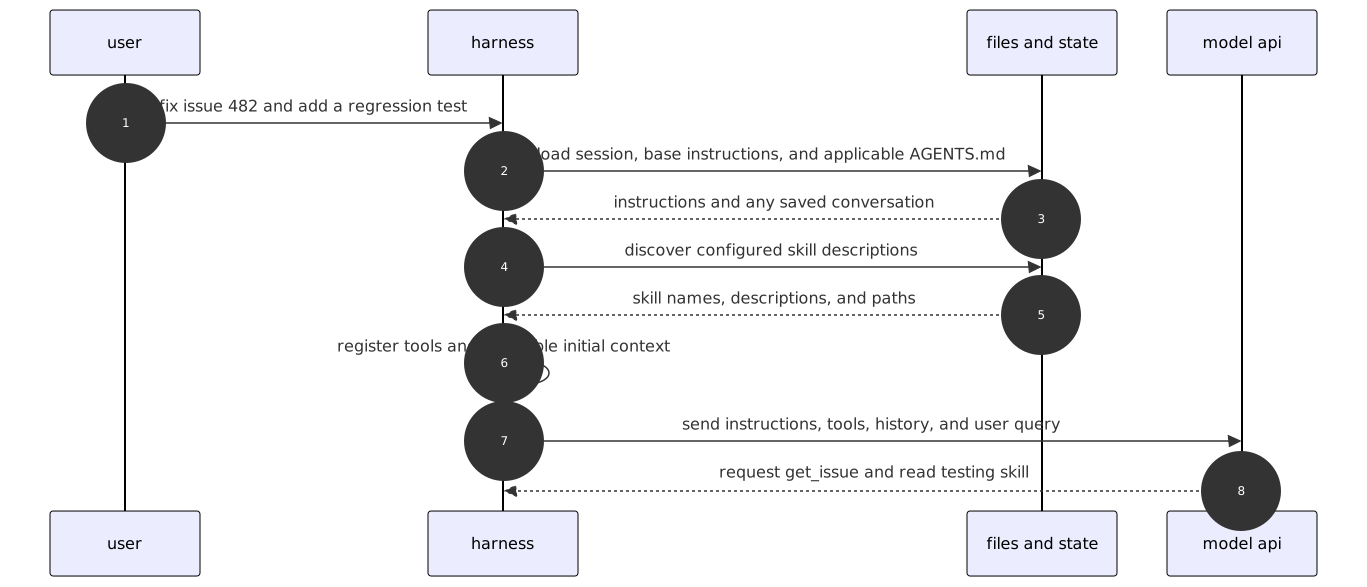
time moves from top to bottom. the diagrams are consecutive parts of the checkout task. “tools” represents the configured execution and integration layer, wherever it is hosted.
part 1: user query to first model call
part 2: tool calls to verified result
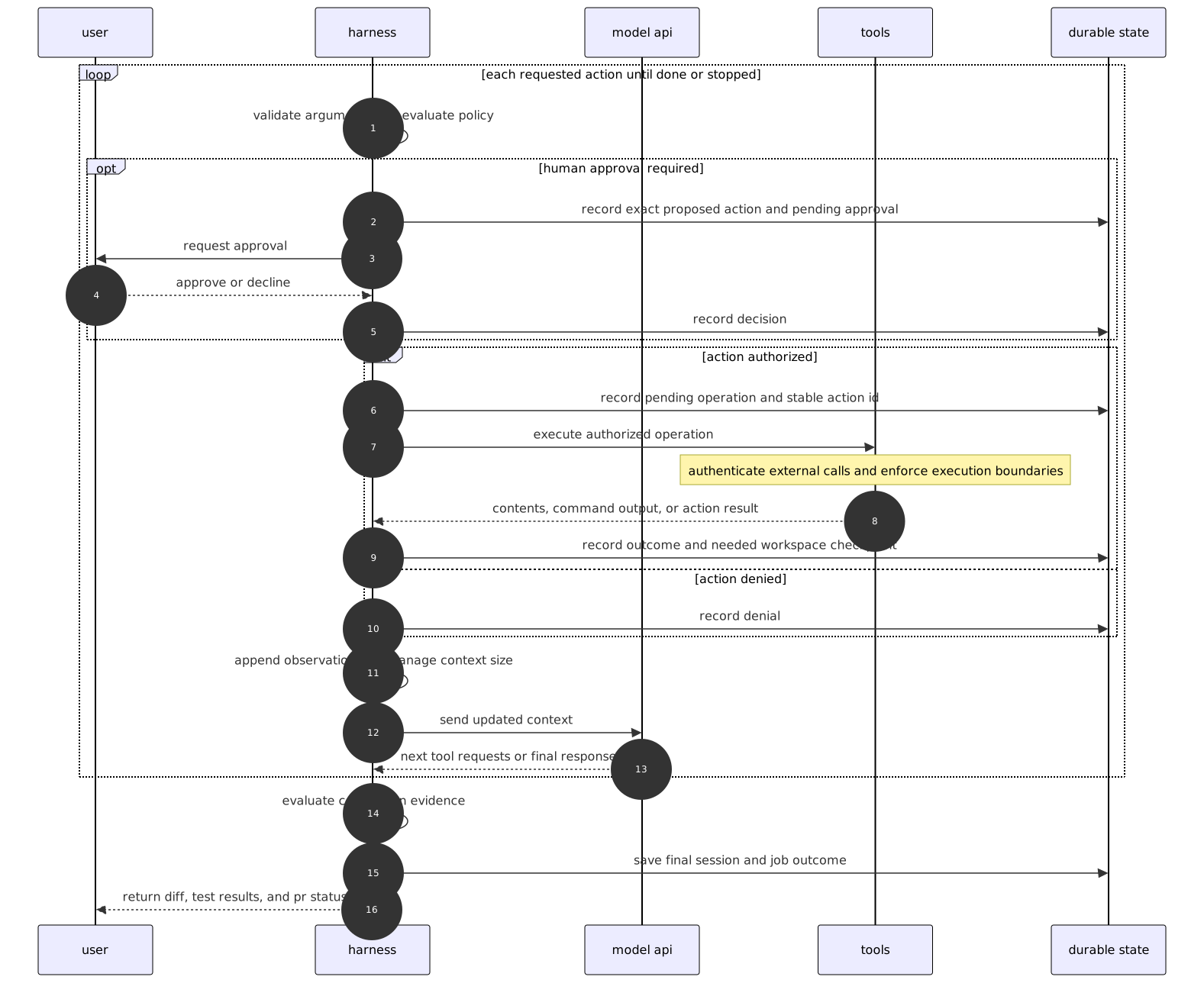
the durable state writes represent recovery mechanisms the application must implement. a basic harness may save only a transcript. recording a pending action does not make it atomic with an external service.
a final model response is not proof that the task passed its checks. the application should evaluate actual test results and other acceptance evidence before marking the job complete.